Copic Penguins Christmas Card
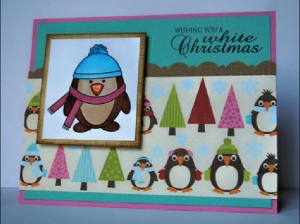
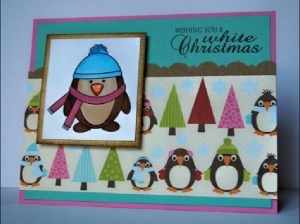
In this copic markers tutorial from Latrice Murphy, you'll learn how to add color with copic markers while making cute penguin Christmas card designs! The copic penguins Christmas card is whimsical and adorable, perfect to send to family and friends.
Materials:
- Cardstock: Bazzill
- Patterned paper: Jillibean soup
- Stamps: Our Craft Lounge
- Ink: Ranger Distress Ink and Tsukineko Memento black
- Punches: EK Success
- Markers: Copic
- Adhesive: EK Success and Tombow
- Other: Glossy Accents, Sparkly fluff by Our Craft Lounge
Videos:
Instructions:
- Make your card from Pink cardstock.
- Trim a piece of kraft cardstock down to 1”x5-½” and make a scalloped edge with a border punch.
- Trim a piece of patterned paper down to 2-½”x5-½” and layer over scallop.
- Layer teal cardstock on the pink card base and adhere patterned paper and kraft trim.
- Stamp you sentiment in the upper right hand corner of the card in black ink.
- Next stamp you image onto white cardstock and color with Copic markers.
- Ink the edge of cream cardstock. This will be your images matte.
- Adhere colored image to cream cardstock and add 3D squares to the back. Adhere this to your card front.
Read NextWinter Snowman Note Cards Tutorial
Your Recently Viewed Projects
Thanks for your comment. Don't forget to share!


Weberme
Dec 01, 2016
Wow. Two great videos one to show how to color with your copic markers and how to blend the colors and the second on how to put the card together. I can not wait to make some cards not only for Christmas but for anytime. This really inspires you to make your own cards and the videos are very well done. You can follow the steps easily and she explains things in detail. I would add some glitter for sparkle. Who would not love receiving a card like this?

appledip71
Jan 14, 2012
beautiful! it inspires me to start creating all my own cards instead of buying them @ the store. mental gears turning as i type this...so many occasions, and a personal touch with each card! thank you, latrice!

Report Inappropriate Comment
Are you sure you would like to report this comment? It will be flagged for our moderators to take action.
Thank you for taking the time to improve the content on our site.